
A vulnerable chat overlay, an unsandboxed Chromium renderer, and a V8 bug already exploited in the wild were enough to turn viewer-controlled text into native code execution, with OBS itself left at its default settings.
I found a Twitch chat overlay that rendered viewer messages as raw HTML inside an OBS Browser Source. That gives a viewer JavaScript execution inside OBS’s embedded Chromium browser. The latest release of OBS at the time shipped a Chromium build that ran without its normal sandbox, and its V8 version was still vulnerable to CVE-2024-7971, a bug already exploited in the wild.
Put together, the message started in Twitch chat and ended in full control of the streamer’s machine.
It started with a screenshot
A friend of mine had vibecoded a small Twitch chat overlay for OBS and posted a screenshot of it. If you’ve never messed with streaming setups before, a chat overlay is basically just a tiny web page that OBS renders on top of the stream through a Browser Source. It might pull in live chat messages, alerts, donations, or whatever else you want viewers to see on screen.
The screenshot happened to show some of the code too, and one line immediately caught my attention: chat messages were being dropped straight into the page as HTML, without sanitization.
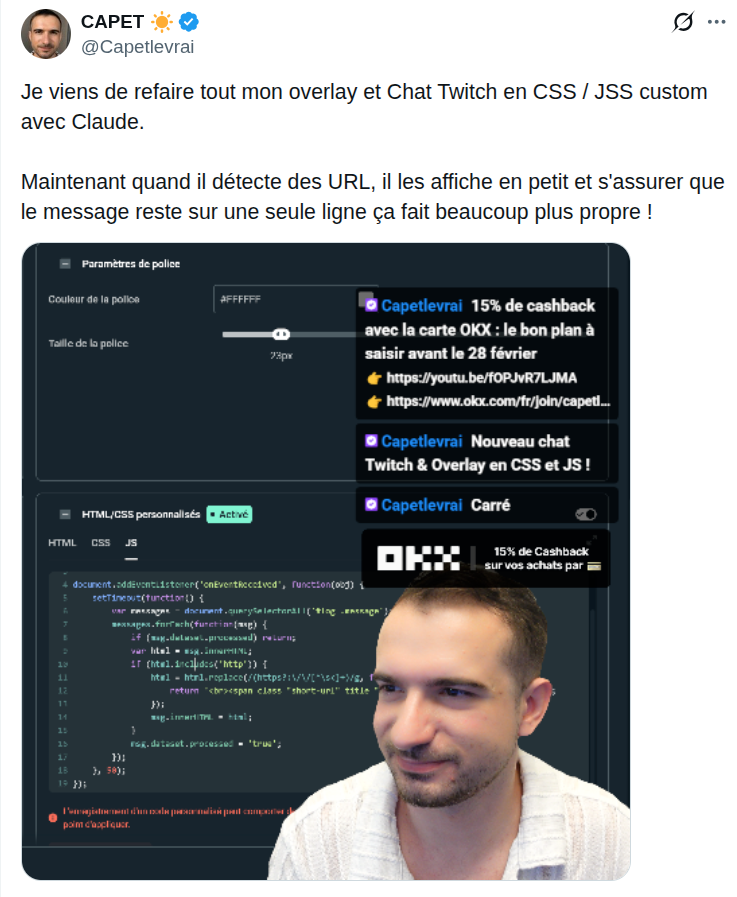
That is a classic XSS. You have probably seen this exact setup before: a viewer controls the message, the overlay treats it as HTML instead of text, and attacker-controlled content can execute inside the page. I’m sure some of you are already shaking your head, with good reason.
It reminded me of an old video by Micode about attacking OBS through its WebSocket interface. The idea was to use a chat XSS as the entry point, then talk to OBS’s local WebSocket server to trigger actions such as switching scenes or stopping the stream.
That route is much less interesting today. OBS WebSocket server is disabled by default, and when enabled it requires a password (it generates one automatically).
I wanted something stronger: one Twitch message, latest OBS, stock configuration, no interaction from the streamer, and code execution on the machine itself.
The WebSocket was not going to get me there.
The browser might.
There is a full browser inside OBS
OBS Browser Sources are powered by Chromium through CEF, the Chromium Embedded Framework. They are used for chat boxes, alerts, donation widgets, animations and custom overlays. The same browser component also powers browser docks and service integrations.
So this tiny chat layout was actually running inside a full Chromium browser embedded in OBS.
With the XSS in place, viewer-controlled JavaScript was now executing inside Chromium on the streamer’s machine.
That alone is not code execution on Windows. Browsers have security boundaries specifically to prevent web content from turning into control of the host.
But OBS’s browser was missing an important one.
The Chromium sandbox is disabled
Chrome normally isolates renderer processes using a sandbox. Even if an attacker exploits a memory corruption bug and achieves native code execution inside a renderer, they normally still need to cross that sandbox before reaching the host.
OBS initializes its embedded CEF browser with:
CefString(&settings.log_file) = log_path_abs;
settings.windowless_rendering_enabled = true;
settings.no_sandbox = true;

uint32_t obs_ver = obs_get_version();
uint32_t obs_maj = obs_ver >> 24;
That setting is present directly in the current obs-browser source.
The XSS still only gives us JavaScript. But if that JavaScript can exploit V8 and become native code execution inside the renderer, there is no Chromium sandbox left to escape.
So I checked which Chromium version OBS was shipping. Let’s just say the answer was not what I had hoped for.
Then CVE-2024-7971 entered the chat
The latest release of OBS at the time of this post, which is what I tested, used Chromium 127.0.6533.120 and V8 12.7.224.18.
That was interesting because CVE-2024-7971, a type confusion in V8, affects Chromium versions before 128.0.6613.84. Google patched it in Chrome 128 on August 21, 2024.
This was not a theoretical browser bug. Microsoft documented it being exploited by the North Korean threat actor it tracks as Citrine Sleet, and CISA added it to its Known Exploited Vulnerabilities catalog.
In the attack Microsoft observed, exploiting V8 gave code execution inside Chrome’s sandboxed renderer. The attackers still needed another vulnerability to escape that sandbox.
Inside OBS, that particular barrier was already disabled.
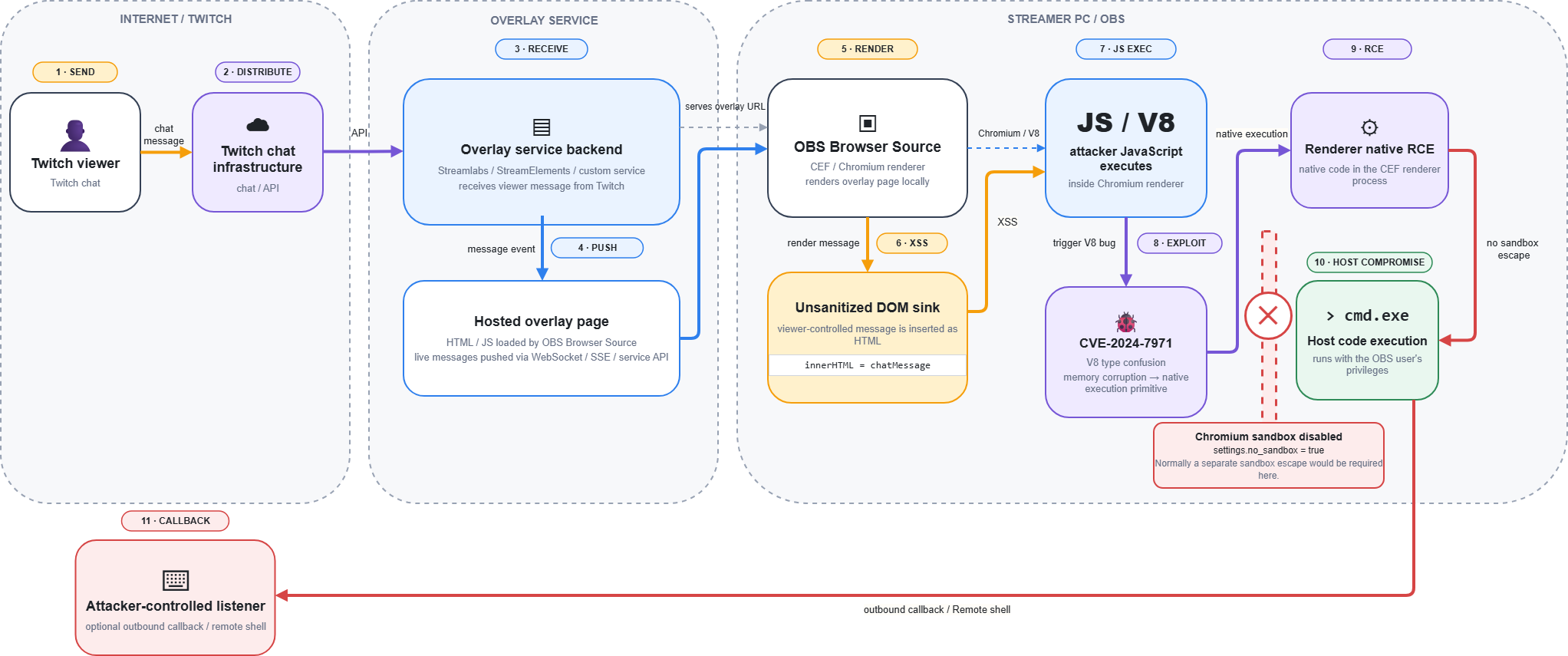
The pieces lined up:
Building the chain
There was no public proof of concept targeting the exact CEF build I was testing, so I built my own.
During development, I enabled Chromium remote debugging and used the DevTools protocol to inspect the renderer and debug the exploit.
At a high level, the V8 bug gives the page memory access it should never have. From there, the exploit develops that into broader process memory access and eventually native code execution.
I’m deliberately leaving the exploit internals out of this post.
The final result is much easier to explain: a viewer sends one malicious Twitch chat message, the vulnerable overlay turns it into JavaScript execution, the V8 exploit turns that into native code execution, and the attacker ends up with arbitrary code running on the streamer’s machine.
What I mean by “default configuration”
This does not mean a fresh OBS installation is remotely exploitable by anyone in Twitch chat. The zero-click entry point in my demonstration is the vulnerable overlay: the streamer has to be using a Browser Source that renders viewer-controlled content without properly sanitizing it.
Once that page is loaded, however, I did not weaken OBS to make the rest of the chain work. No WebSocket setup, no admin privileges, no sandbox option changed by the user, and no click from the streamer.
The Twitch overlay is also only one way to reach the browser. More generally, an attacker-controlled page loaded into an OBS Browser Source or browser dock could potentially start directly at the browser-exploitation stage. The chat XSS is what makes this particular chain remote and zero-click from the viewer’s perspective.
The interesting part is therefore not the XSS itself. It is where attacker-controlled web content is running.
Why this matters
Streaming setups are full of web content. Chat boxes, donation alerts, follower notifications and custom widgets are all web pages, and much of their data comes from strangers on the internet.
If a chat message is text, render it as text. If you genuinely need HTML, sanitize it properly.
What OBS is doing about it
The OBS team confirmed both fixes are already in motion.
The first is upgrading the embedded browser. The main blocker was the new Chrome Runtime, which until very recently did not support the kind of off-screen rendering OBS relies on. Chromium 127 reached stable in July 2024, which means the engine in OBS 32.2.2 is now roughly two years behind.
That upgrade is already underway: a pull request moving obs-browser to CEF 128+ is currently under review and targeted for the OBS Studio 33.0 milestone (obs-browser PR #523, obs-studio discussion #3853). Once merged, it would fix the specific V8 bug used in this post. But OBS is an open source project maintained largely by volunteers, and getting this upgrade to this point takes months of testing and compatibility work.
The second fix is enabling the CEF sandbox, which is also being tested as part of the same update. It was originally disabled because it broke authentication for some service integrations, but the team suspects those issues may now be resolved. If the sandbox can be turned back on, exploiting the browser would no longer be enough on its own: an attacker would also need a second vulnerability to escape the sandbox.
For a component whose entire job is to render potentially untrusted web content, both layers matter. Keeping the browser engine reasonably close to current security releases is just as important as having a sandbox around it.
Until those changes ship, the part that remains in everyone’s hands is what gets loaded into these plugins. Anything inside a Browser Source should be treated as untrusted input and, in particular, no widget should ever render viewer content as HTML. That is the fix a streamer or an overlay author can make today.
Disclosure
Target: OBS Studio 32.2.2 on an updated Windows 11
- 14 February 2026: Coordination with the overlay author.
- July 2026: Reproduced the full chain end-to-end on Windows 11
- 19 August 2026: Reported to OBS.
- 20 August 2026: OBS acknowledged, CEF update in progress, no separate CVE per policy.
- 25 August 2026: OBS confirmed the sandbox re-enablement is being tested as part of the update.
- 10 September 2026: Pull request 523 was merged in obs-browser.
- 17 September 2026: Pull request 13890 was merged in obs-studio.
- 22 September 2026: Publication